
Enroad - Drive Tracker
11X StudioAuto & Vehicles
4.6131.00 Reviews
- Version
- 2.4.0
- Installs
- 100.00K
- Age Rating
- Everyone
Screenshots
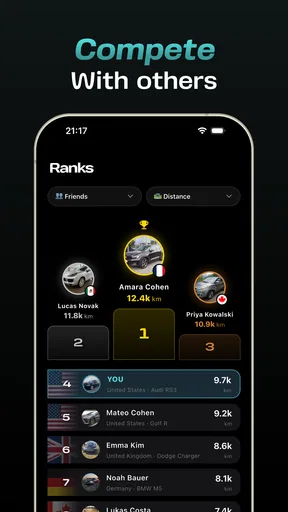
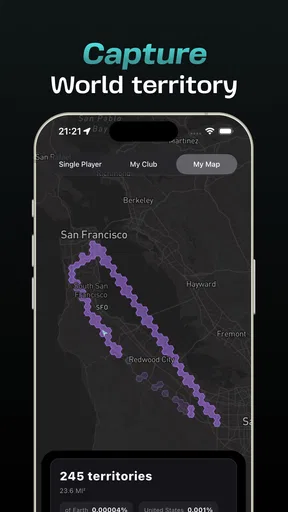
Our Review of Enroad - Drive Tracker
 Analysis by Appyee
Have you ever hit the road and wondered how fast you were really going? Well, maybe you need a trusty sidekick like TripRank - Speed Tracker. I've been tinkering with this app for a while now, and I'm ready to spill the tea on whether it's worth your download time or just another digital dust collector.
First Impressions
So, you fire up TripRank - Speed Tracker, and bam, you're greeted with a sleek, user-friendly interface. It's like the app knows you’re not trying to solve a Rubik's cube while driving. Everything is laid out in a way that just makes sense. The main dashboard is all about simplicity, with your current speed front and center, which is perfect for those of us who need the info at a glance.
Features That Stand Out
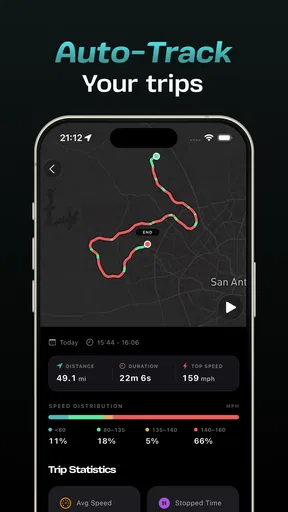
TripRank isn't just about speed tracking; it’s got a few more tricks up its sleeve. First off, there's the trip history. Imagine having a personal speed diary; it logs your trips, so you can look back and see how you’ve been driving. Was it a smooth cruise or a need-for-speed kind of day? It's all there.
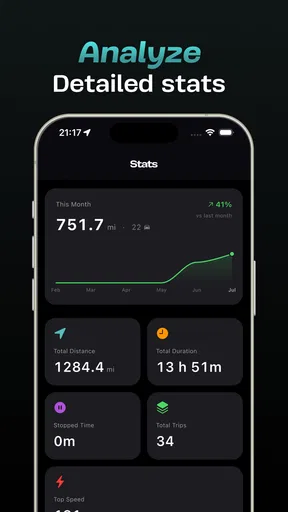
Another nifty feature is the average speed calculator. This is a game-changer if you’re trying to keep your driving consistent. Plus, for anyone living in areas with speed limits that change faster than a chameleon’s colors, it’s a lifesaver. You can set speed alerts, so you don't accidentally transform a leisurely drive into a ticket-collecting spree.
Why You Might Love It
If you’re the kind of person who loves data, then this app is your jam. I mean, who doesn’t want to know their top speed on that last road trip? It's like having your own personal pit crew, keeping tabs on the little details that you might miss while singing along to your road trip playlist.
And speaking of playlists, the app doesn’t interfere with your music. That’s a big plus. You can track your speed and still rock out to your favorite tunes without a hitch. It runs smoothly in the background, and you barely notice it’s there—until you need it, of course.
Could Be Better
Now, let’s get real. No app is perfect, and TripRank - Speed Tracker is no exception. One thing I noticed is the battery drain. If you're on a long haul, you’ll want to keep that charger handy. It’s like the app gets a bit thirsty for power, which can be a bummer.
Another potential hiccup is the GPS accuracy. Occasionally, it can be a bit off, especially in areas with spotty signal. But hey, that’s more of a tech issue than the app’s fault, right? Still, it’s something to keep in mind if you’re planning a journey through the wilderness.
Final Thoughts
Overall, TripRank - Speed Tracker is pretty solid. It’s got the right mix of features without being overwhelming. If you’re someone who loves to keep track of every little detail of your drive, or just wants a bit of extra help staying within speed limits, this app is a worthy contender.
Its user-friendly design and comprehensive features make it a top pick for anyone looking to enhance their driving experience. Just remember to pack your charger, and you’ll be good to go. So, are you ready to hit the road with TripRank by your side?
Verdict
Strengths of Enroad - Drive Tracker
- User-friendly interface for easy navigation.
- Accurate speed tracking in real-time.
- Customizable alerts for speed limits.
- Battery-efficient performance during use.
- Supports offline tracking capabilities.
Limitations of Enroad - Drive Tracker
- Requires GPS for optimal accuracy.
- Limited compatibility with older devices.
- Ads can be intrusive at times.
- Lacks integration with smartwatches.
- No social sharing features available.
Similar Picks in This Category
View All
Android Auto
Google LLC4.1

maxim — order a taxi & food
PT. SITO4.7

Штрафы ГИБДД: проверка с фото
Pays LLC – Штрафы ГИБДД4.7

Номерограм – проверка авто
Авто Ассист4.8

Дром Авто
Дром4.9

Frequently Asked Questions
What is TripRank - Speed Tracker, and how does it work?
TripRank - Speed Tracker is a mobile application designed to help users monitor their speed while traveling. The app uses your device's GPS to track your speed in real time, providing accurate data on your travel velocity. It's ideal for drivers, cyclists, and joggers who want to keep a close eye on their speed for safety and performance purposes.
Is TripRank - Speed Tracker available on both Android and iOS?
Yes, TripRank - Speed Tracker is available for download on both Android and iOS platforms. Users can find it on the Google Play Store for Android devices and the App Store for iOS devices, ensuring wide accessibility for all types of smartphone users.
Does TripRank - Speed Tracker require an internet connection to function?
TripRank - Speed Tracker primarily relies on GPS technology, which does not require an internet connection. However, certain features like map integration or trip sharing might need internet access. It's advisable to check specific app settings for details on offline functionality.
Are there any subscription fees or in-app purchases in TripRank - Speed Tracker?
TripRank - Speed Tracker offers a free version with essential features. However, there may be in-app purchases or subscription options to unlock additional features, such as advanced analytics or ad-free usage. It's best to explore the app store listing for detailed pricing information.
How accurate is the speed measurement in TripRank - Speed Tracker?
The accuracy of speed measurement in TripRank - Speed Tracker largely depends on the quality of the GPS signal and your device's hardware. Generally, the app provides reliable speed data, but users may experience slight variations depending on environmental factors like tall buildings or dense forests.
